 Bear Liu
How did Linear reach $100M ARR?
Linear's advantage is not only speed. It decided very early who it was for, accepted who it would lose, and turned that restraint into a business that passed $100M ARR on roughly $35,000 of lifetime marketing.
Summary
This article looks at four ideas:
-
How Linear uses visual language to make engineers feel, within seconds, that the product was made for them.
-
How keyboard shortcuts gradually become muscle memory and raise the cost of leaving.
-
Why a core feature like Cycles does not appear by default on the first day.
-
How Linear reduces marketing, sales, support, and development costs by refusing certain features and customers.
The central argument is simple: Linear’s advantage comes from more than speed. It also comes from a long-term commitment to clear product boundaries.
People who build products often worry that they do not have enough features.
A customer asks for something, so the team adds another option. A competitor launches a new capability, and a similar item soon appears on the roadmap. The product gradually becomes more complete, and gradually becomes more complicated.
Linear chose a different path.
It supports only one level of sub-issues. Its mobile experience is incomplete. Many of the complex processes required by large enterprises are missing. Even Cycles, often described as one of Linear’s core selling points, does not appear by default for new users.
These limitations will clearly disappoint some customers, and Linear accepts that they will leave.
The interesting part is that the company has reportedly spent only about $35,000 on marketing since it was founded, yet it has already grown beyond $100 million in annual recurring revenue.
That made me reconsider a question:
When a company deliberately gives up a group of customers, is it losing revenue, or building a more efficient business?
Many people reduce Linear’s success to one word: speed.
Linear is fast. Its interactions typically respond in under 50 milliseconds, while some actions in Jira can take anywhere from 800 to 3,000 milliseconds. You do not need performance testing software to notice the difference. Open the app, create an issue, change its status, and you can feel it immediately.
But speed alone does not explain the rest of Linear’s numbers.
According to publicly available information, Linear has spent roughly $35,000 on marketing since the company was founded. That is the total amount, not a monthly budget. At the same time, the company has passed $100 million in annual recurring revenue, with net revenue retention of around 180 percent. Existing customers do not simply stay. Many of them expand their spending over time.
Linear has also been profitable since 2021, and reportedly has more cash in the bank than it has ever raised from investors.
It is difficult to build that kind of business by being slightly faster than Jira.
Speed can be copied. A competitor can rebuild parts of its architecture, improve caching, reduce loading time, and gradually close the gap. The harder part to reproduce is hidden inside everything Linear has chosen not to build.
Linear’s real strength is that it decided very early who it wanted to serve, and accepted who it would lose as a result.
Through its visual design, interactions, product structure, and default settings, Linear repeatedly sends the same message to a particular kind of user: this tool was made for you.
At the same time, it quietly tells everyone else that they may be better served by Jira, Asana, or another product.
That restraint has become one of Linear’s most important competitive advantages.
The first few seconds already decide who stays
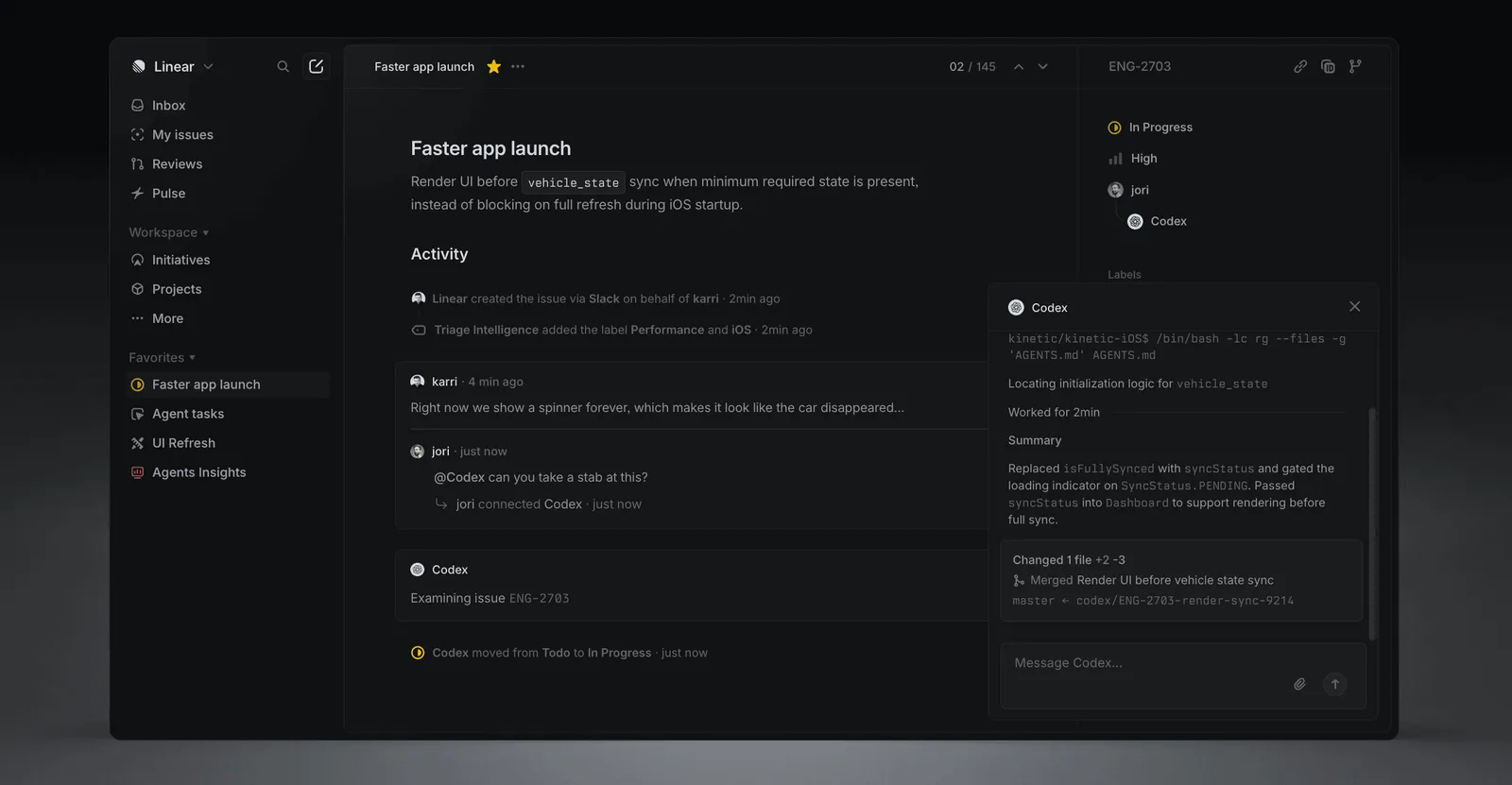
Open Linear and ignore the features for a moment. Just pay attention to how it feels.
The background is dark. The text is mostly grey and white. Information density is high, and there are almost no illustrations, decorative gradients, or friendly visual flourishes. The product belongs to the same visual world as a code editor or terminal, rather than a notebook app or collaborative whiteboard.
This is more than a designer’s aesthetic preference. It works like the entrance to a restaurant.
Walk into a brightly lit restaurant filled with children’s chairs and family meal deals, and you immediately understand who it is trying to welcome. Walk into another place with twelve seats, an open kitchen, specialist equipment, and a menu that changes every day, and you know that it expects something different from its customers.
Products work in much the same way.
Users rarely read dozens of pages of feature descriptions before deciding whether a tool is right for them. Many of those decisions happen within the first few seconds. The colours, typography, density, buttons, and information structure are already answering a question:
“Do people like me belong here?”
Linear’s answer is unusually clear.
It primarily serves engineers, along with product managers who tend to think like engineers. Technical teams at companies such as OpenAI, Cursor, Perplexity, and Scale AI use it. Linear’s visual language and interaction model belong to the same world as the tools these users already work with every day, so there is very little cognitive mismatch.
The adoption pattern reflects this. Linear performs particularly well among small, fast-moving, technically driven teams, while adoption is lower in large enterprises. It has never tried to make every kind of organisation feel equally welcome.
That leads to a practical product question.
When building software, teams often treat visual design as packaging. First, they decide what the product does. Later, they choose a style that makes it look appealing.
Users experience the order in reverse. They see the packaging first, and then decide whether the features are worth exploring.
Visual language is the first sentence of your product strategy.
Your product might look as though it is inviting freelancers, while the people expected to pay are enterprise buyers. Or it might resemble a professional engineering tool, even though the intended audience consists of ordinary consumers using this kind of software for the first time.
That mismatch begins lowering conversion before the user has completed a single task.
So one of the first questions I ask when looking at a product is:
Is the person being invited in by the first impression the same person who will eventually pay?
When the answer is unclear, adding more features rarely repairs the gap.
How keyboard shortcuts make it harder to leave
Almost every common action in Linear has a keyboard shortcut.
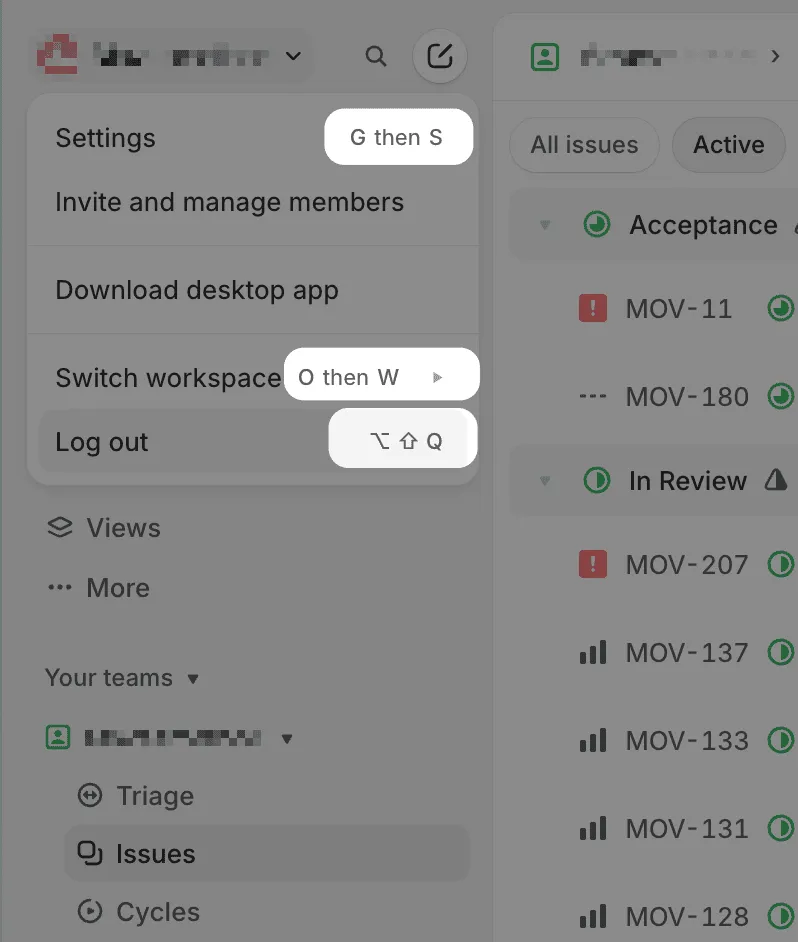
You can change the status of an issue, adjust its priority, expand a list, create a new task, or switch workspaces without reaching for the mouse. Hover over an action, and its keyboard shortcut appears inside the tooltip.
It is a small design decision, easy to overlook, but it creates an extremely cheap user training system.
Linear does not need to interrupt people with a large onboarding tutorial. It does not need to send them to a ten-minute instructional video. It simply adds a few characters to a tooltip they were already going to see.
The first time, the user may still click the button. The second time, they might notice the shortcut and try it. After a few weeks, many repeated actions no longer require conscious thought. Their fingers already know what to do.
The value goes far beyond saving a second or two.
In most software, the learning cost remains largely cognitive. Users have to remember where a feature lives, which page contains a setting, or which menu creates a project. When they switch to another product, they spend a few days learning the new layout and eventually adjust.
Linear turns part of that learning into muscle memory.
It is similar to driving. You do not consciously calculate how far to turn the steering wheel each time you enter a corner. You do not analyse where your foot should move before braking. Those actions have become physical habits, which is why a vehicle with a very different control system can feel uncomfortable even when it is technically easy to operate.
After working in Linear for several months, leaving means giving up an entire set of familiar hand movements. The switching cost no longer comes only from migrating data or comparing features. It also comes from retraining the body.
This retention mechanism depends on the audience Linear has already selected.
Engineers spend their days inside terminals, code editors, and keyboard-first tools. Linear is connecting itself to habits that already exist. It does not need to teach these users a completely new way of working. It only needs to extend a way of working they already understand.
Asana or Notion could add the same number of keyboard shortcuts tomorrow. Their audiences are broader, and many of their users still prefer clicking or touch-based interactions. The same feature can create very different value in different products.
A feature rarely becomes an advantage on its own. It becomes an advantage when it connects with the existing habits of a specific group of users.
The useful question, then, is not simply whether your product should add more keyboard shortcuts.
Which interactions in your product are gradually becoming habits? Can those habits be carried into a competing product, or do they only make sense inside yours?
The first kind improves efficiency. The second kind strengthens retention.
Why the most important feature does not appear on day one
Many articles about Linear mention a feature called Cycles.
A Cycle is Linear’s way of organising work into a repeating period, often one or two weeks. Teams can use it to plan what they want to complete during that window. It is one of the features that separates Linear from a basic task list.
Strangely, when I opened Linear as a new user, I could not find Cycles anywhere in the sidebar.
I eventually went into the settings and enabled the feature manually. Only then did it appear.
Hiding an important feature feels counterintuitive. If a company has invested months building one of its core capabilities, why would it keep that feature out of sight on the first day?
Linear’s answer lies in how carefully it manages a new user’s attention.
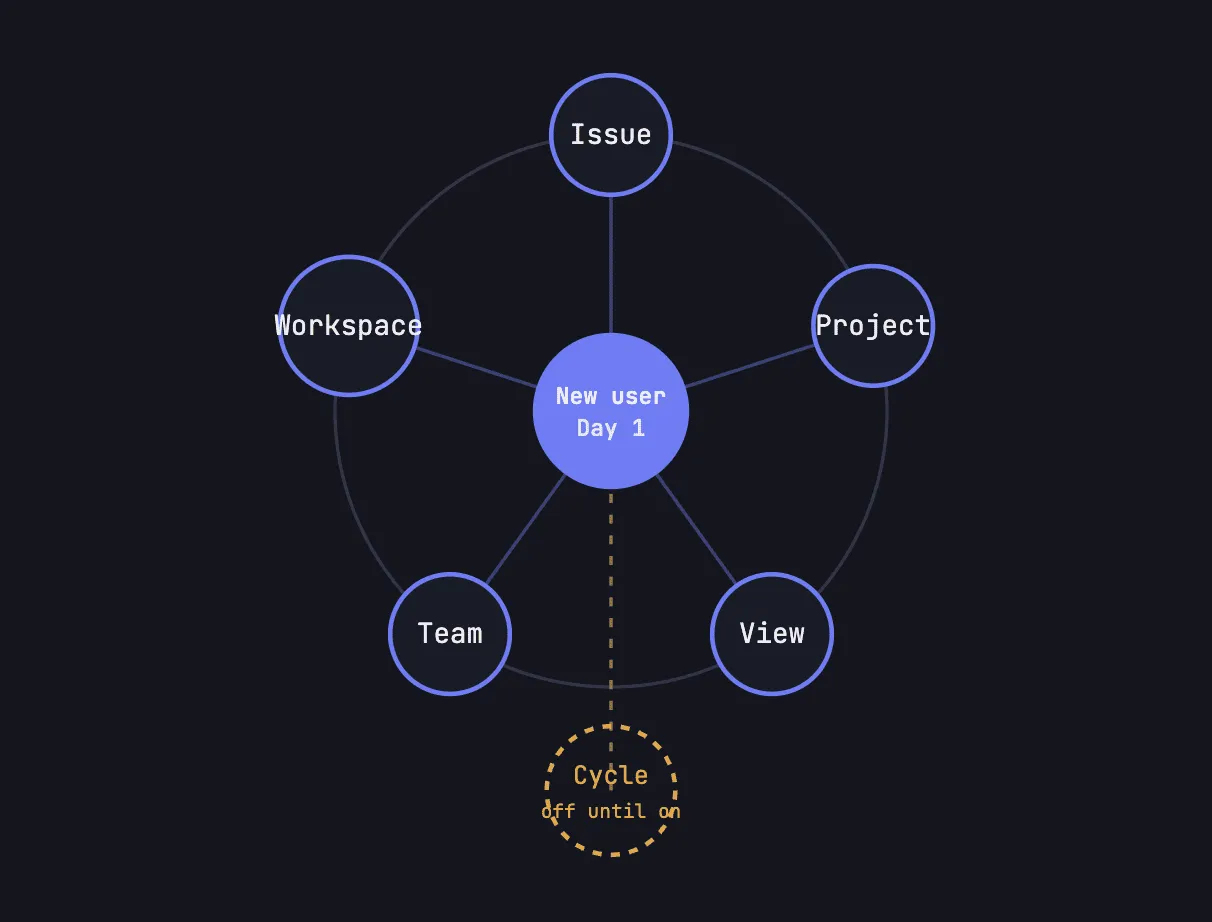
When someone first enters the product, they need to understand five main concepts:
Issue, meaning a task.
Project, meaning a larger body of work.
View, meaning a particular way of seeing information.
Team, meaning a group of people working together.
Workspace, meaning the overall environment containing everything else.
If Cycles appeared by default, the user would immediately need to understand a sixth concept, along with its relationship to issues and projects.
That is not difficult for a team already familiar with agile development. However, many potential users do not work in sprints or plan their work around fixed cycles. If Linear forced everyone to understand that concept from the beginning, it would be charging a learning fee before those users had received any value.
Many products make the same mistake during onboarding: the more important a feature feels internally, the sooner the company wants users to see it.
From inside the company, the logic makes sense. The team may have spent months developing the feature. Sales materials emphasise it. Investors and journalists describe it as a key differentiator. Product managers naturally feel that it deserves the most prominent position on the screen.
Users have no idea how much effort the company invested, and they do not particularly care. They only judge whether the additional information in front of them is useful right now.
A professional camera app may contain dozens of controls, but a new user taking their first photo only needs to focus and press the shutter. A gym may contain dozens of machines, but a new member does not need to understand how to train every muscle group during their first visit.
The strategic importance of a feature does not determine when the user should encounter it.
Linear accepts the trade-off. With Cycles disabled by default, some teams may never discover the feature. Its adoption may remain lower than its importance to Linear’s broader strategy would suggest.
In return, Linear gets a much lower entry barrier.
A team that does not follow agile development can still begin by using Linear as a straightforward task management tool. Later, when the team needs a more regular working rhythm, it can enable Cycles.
The design principle is simple:
The number of concepts a user must understand on day one should be kept as small as possible. Everything else can wait until the need appears.
That produces another useful product question:
Which concepts are genuinely necessary for users to complete their first meaningful task, and which concepts does the company simply want them to notice?
Those two lists are rarely identical.
The features Linear did not build are also choosing its customers
When analysing a product, people naturally focus on the features that exist. In many cases, the missing features tell us more about the company’s choices.
Linear only supports one level of sub-issues. It does not offer a deeply nested task hierarchy. One of the teams I work with is particularly unhappy with this limitation.
Its default interface contains almost no decorative graphics.
The mobile experience is relatively limited because keyboard shortcuts and hover-based tooltips do not translate naturally to a touchscreen.
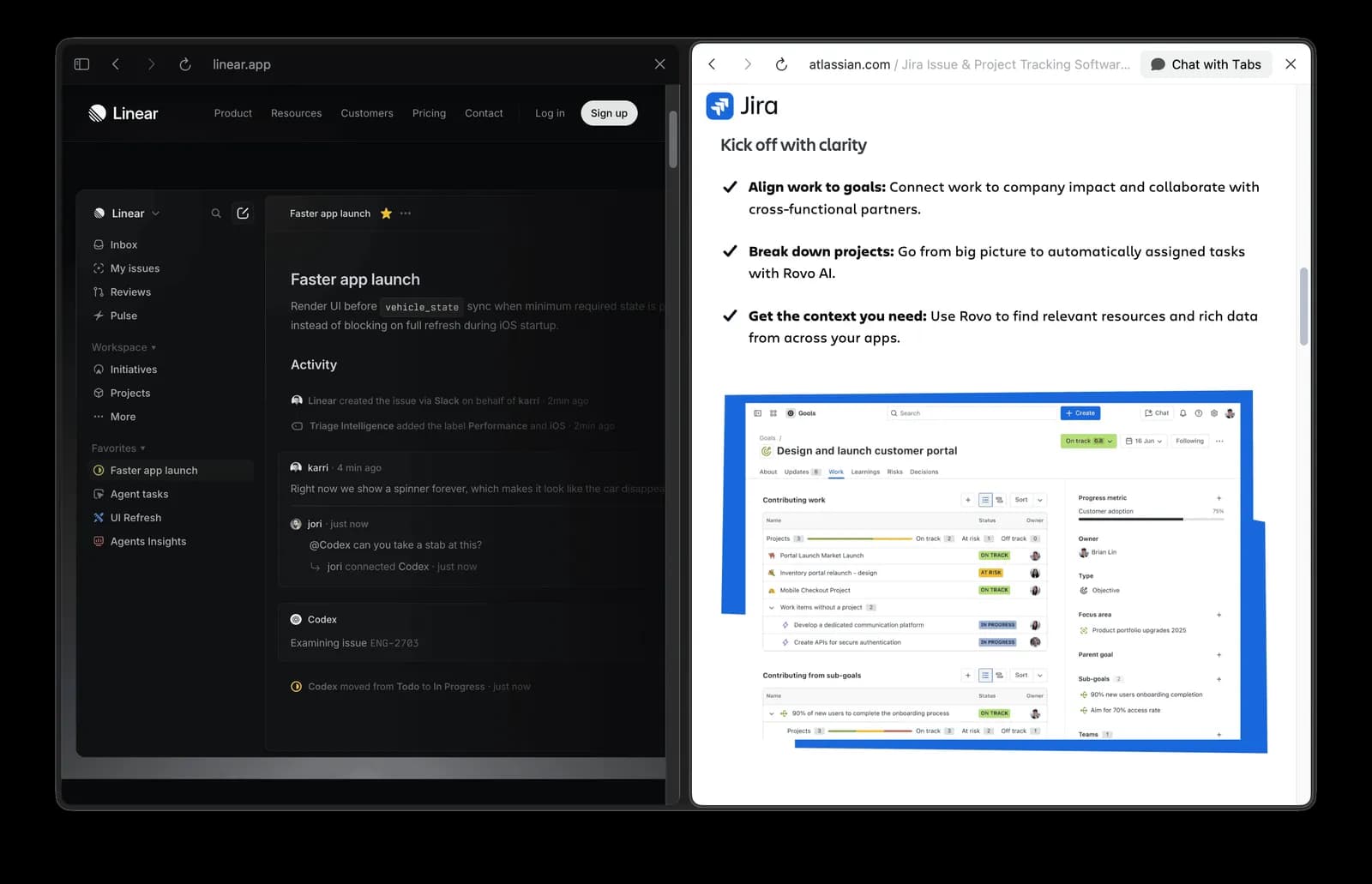
Linear also avoids stacking concepts in the way Jira does with Boards, Sprints, Epics, Components, Versions, and many other layers.
Every omission means that some users will consider Linear inadequate.
Large enterprises that require complex permissions and approval processes may choose Jira.
Project managers who rely on deep task hierarchies may prefer another tool.
People who work mainly from their phones will struggle to get the full experience.
A non-technical founder may open Linear, see relatively few visible features, and conclude that it is not “professional” enough.
Linear accepts that these people will leave.
This may sound like the company is giving up revenue. It is also reducing cost.
A customer who is poorly matched to the product brings more than subscription income. They may require longer sales conversations, more training, more complicated support, and a stream of feature requests that matter only to a small group.
When these customers discover the mismatch after adopting the product, the company has already paid to acquire and support them.
Linear’s design allows many of these users to leave earlier. They see the interface, test a few features, and quickly realise that the product does not suit them. Linear loses the possible subscription revenue, but it also avoids the sales, onboarding, support, and development costs that might have followed.
This is where product restraint begins to shape the business model.
Linear can keep its team relatively lean, reduce the need for complicated sales processes, and rely heavily on word of mouth. Its lifetime marketing spend of roughly $35,000 sounds almost impossible, but the number belongs to the same system as the product decisions.
When a product can actively filter its customers, the company does not need a large organisation to serve everyone who walks through the door.
Of course, a simple interface does not automatically create a business advantage.
Notion also has a relatively restrained sidebar, but its ambition is extremely broad. It wants to cover personal notes, knowledge management, project planning, internal company documentation, and many other use cases. Notion aims to become a general workspace for many different kinds of users.
Linear chose a different path. It keeps the interface narrow, but it also keeps the audience and the use cases narrow. It is willing to go deep for engineering teams, and it is willing to give up many adjacent markets.
The important point is that every subtraction reflects a clear choice about the customer.
You need to know what you are removing, and you also need to know who will leave because of it.
What Linear gets right is how it defines its boundaries
Return to the original question.
How did Linear reach more than $100 million in annual recurring revenue with so little marketing spend?
Speed clearly matters. Fast feedback makes a product feel dependable, and it makes actions repeated dozens of times a day more comfortable. But speed is closer to an entrance ticket. It persuades users to try Linear, yet it does not fully explain why they stay, why the company can remain profitable, or why the product grows so effectively through recommendations.
The deeper reason is that Linear keeps making the same kind of choice across the entire product.
It chooses to make engineers feel at home within the first few seconds.
It chooses to use keyboard shortcuts to strengthen working habits those users already have.
It chooses to hide an important feature like Cycles until the user is ready, protecting the limited attention of someone entering the product for the first time.
It also chooses to lose customers who require deep hierarchies, mobile-first workflows, or complicated enterprise processes.
Together, those decisions create a narrow entrance. Fewer people may walk through it, but the people who stay are a better fit. They use the product more often, develop stronger habits, and are more likely to recommend it to similar teams.
When we apply Linear’s decisions to our own products, four questions remain:
-
Who is the product’s visual language inviting in? Is that person also the customer who eventually pays?
-
Which interactions are becoming muscle memory? Will those habits strengthen long-term retention?
-
Which concepts must appear on the first day? Which can wait until the user has a reason to care?
-
Which type of customer has the product deliberately chosen not to serve?
The fourth question is usually the hardest.
Most teams can describe their target customer. Far fewer are willing to name the customer they are prepared to lose. As a result, the product keeps accumulating features, the visual design becomes more neutral, and the language becomes broader, all in the hope that every kind of user will find something useful.
Eventually, everyone thinks the product is “quite good,” but very few people feel that it was made specifically for them.
The most valuable lesson from Linear may not be how to make software faster. It may be how to define the boundaries of a product clearly.
A product’s real boundaries are often shaped by what the company is willing to lose.
When those boundaries are clear enough, they can also become the moat that competitors find hardest to cross.
I will continue writing product analyses like this, looking at how design decisions influence customers, growth, and business models.
If you are building a product, try writing down one type of customer you would refuse to redesign the product for, even if they were willing to pay.
That answer may tell you more about your product strategy than the next feature roadmap.
If any of those questions landed without a clean answer, that gap is worth a closer look.
I write diagnoses like this one for other products: where your design is quietly serving the wrong outcome, what that is costing you, and what to change first. If you would like one for yours, email me at hi@bearliu.com.