 Bear Liu
The two keystrokes that made Raycast, and now trap its AI
Two keystrokes packed launching, searching, window management and 2,500 extensions into a single grammar. That same design now decides how far Raycast's AI can go.
Can a product's most successful design also decide how far it can eventually go?
Raycast uses two keystrokes to pack launching apps, searching files, managing windows and more than two thousand extensions into a single way of working. That is what makes it one of the smoothest productivity tools on macOS.
But once AI arrives, this near-perfect design starts to show a crack. A command bar built for a few seconds of action, one that disappears the moment you are done, can it really hold an AI conversation that needs follow-up questions and wants you to stay?
The first time I used Raycast properly, what surprised me was not how much it can do. It was how deeply it hides all of it.
There is no busy home screen, no row of features waiting to be clicked, nothing that pops up to remind you it exists when you open your laptop. Most of the time, Raycast sits quietly behind a keyboard shortcut. You press the shortcut, type a few letters, run a command, and it disappears again.
On the surface, it looks like a more powerful Mac launcher.
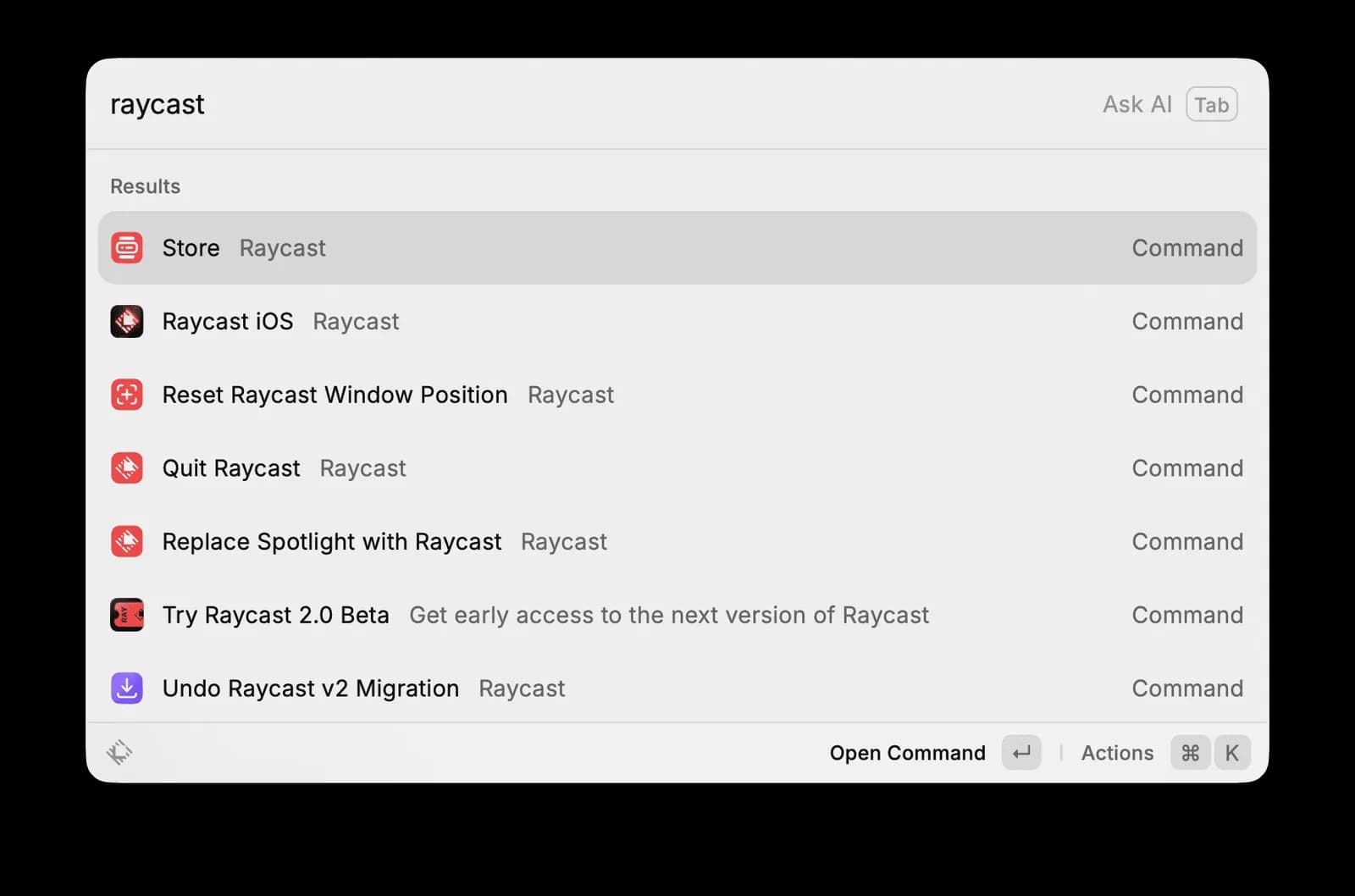
But over the past six years, Raycast has grown from 130 daily active users on the first day of its 2020 public beta to hundreds of thousands of daily active users today. It has raised around 47.8 million dollars, has more than 2,500 open-source extensions, and runs a Slack community of roughly 30,000 people, where the founder still answers feedback himself.
All of it rests on an interaction model that is almost unreasonably simple.
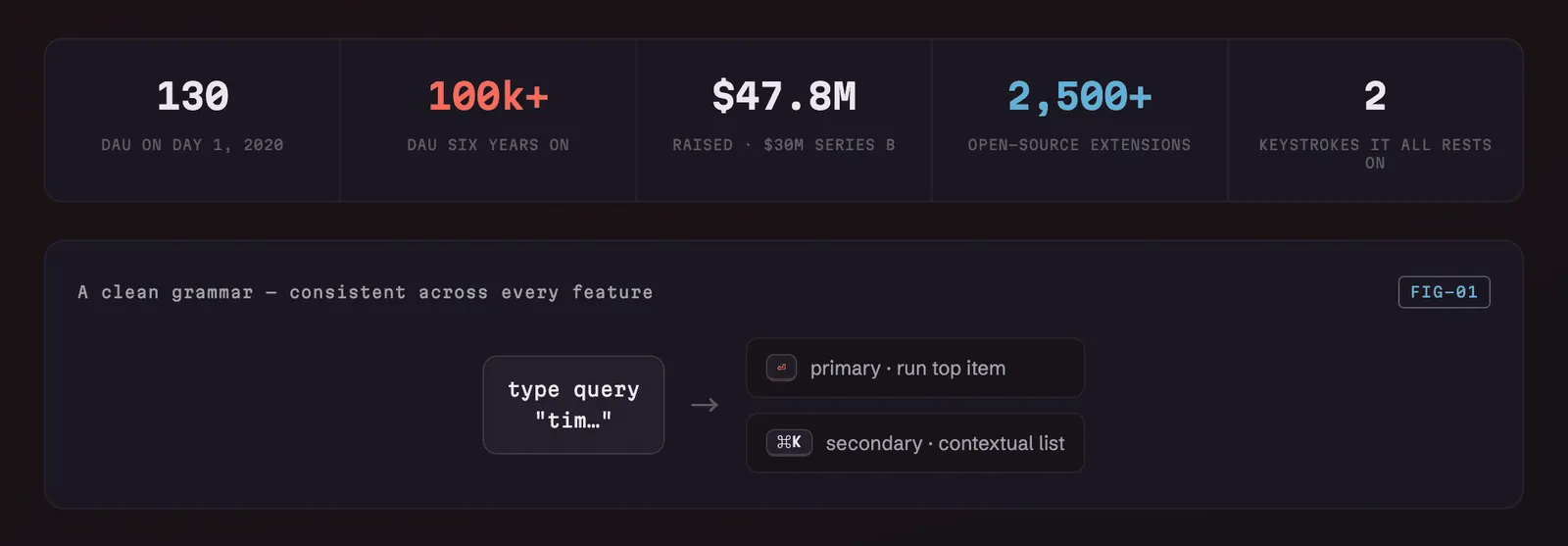
Press Enter to run the main action. Press Cmd+K to see more actions.
That design makes Raycast one of the cleanest, most muscle-memory-friendly productivity tools on macOS. But after two walkthroughs, more than two hours in total, I kept seeing another problem more and more clearly.
Raycast's most powerful design may also be the thing that defines how far it can go.
And once AI enters the product, that problem only gets sharper.
Why two keystrokes can carry 2,500 extensions
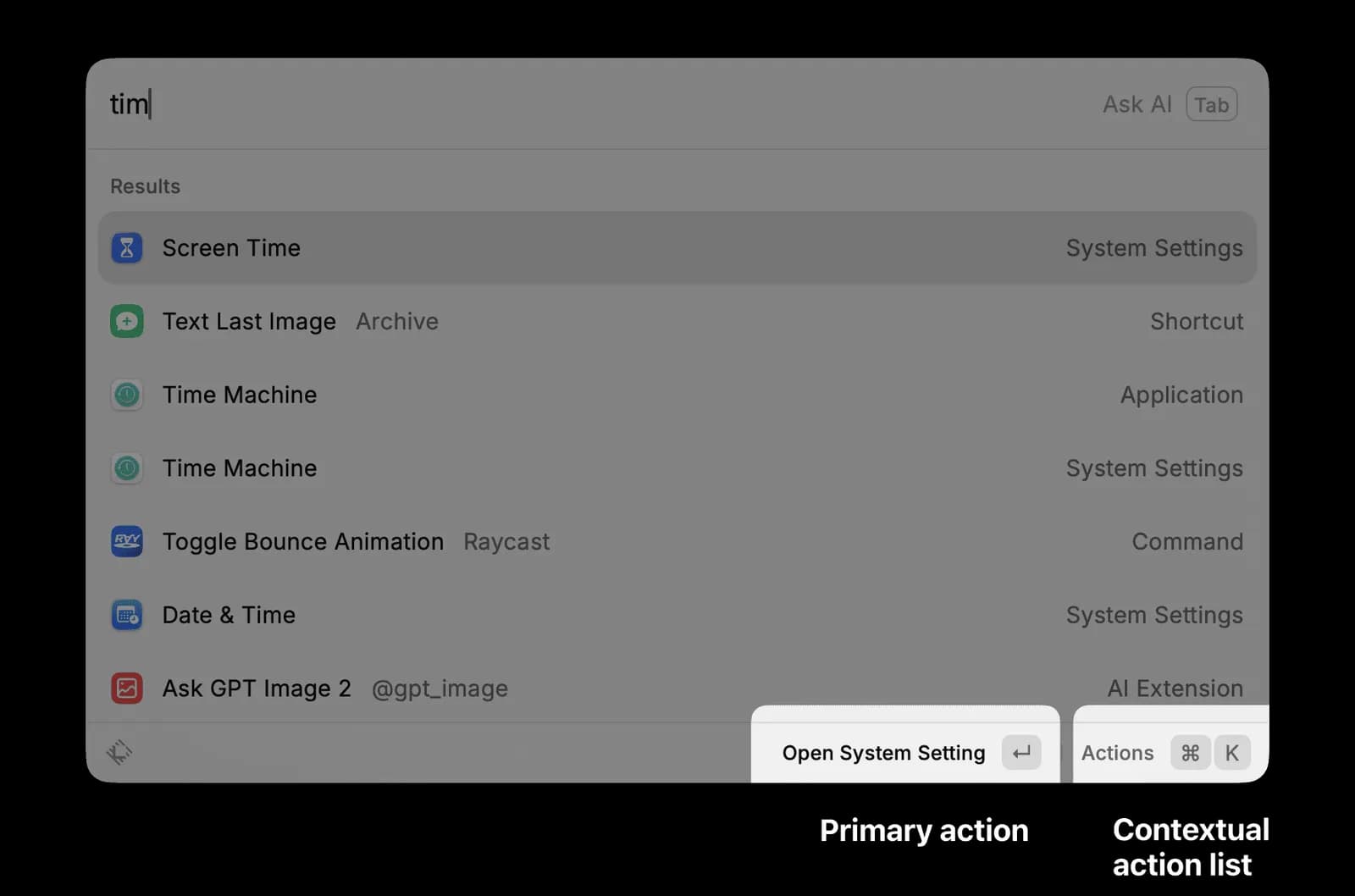
Open Raycast and type three letters: T, I, M.
The list might show Time Machine, Screen Time and Date and Time. Press Enter and Raycast runs the action at the top. Press Cmd+K and it opens a second menu, where you can choose Open Application, Show in Finder, Copy Path or Add to Favourites.
That is almost the entire logic of Raycast.
Enter handles the most likely action. Cmd+K handles the other actions for the current item. Whether you are opening a system command, a file, an app, or an extension built by a third-party developer, it mostly follows the same rule.
This sounds ordinary, but it produces something very important.
Users do not have to learn 2,500 extensions separately. They only have to learn one grammar.
The first time you use a new extension, you already know how to operate it. Enter to run, Cmd+K for more choices. The cost of learning a new feature drops close to zero.
This is also an interesting difference between Raycast and the many products that try to reinvent how you work.
I took the Arc browser apart earlier. Arc wanted users to understand a whole set of new concepts: Spaces, Profiles, Pinned Tabs, Today Tabs, Little Arc. You had to build a new mental model of the product first, before you could feel what made it different.
Raycast went the other way. It borrowed the Enter key and the modifier keys you already know, and packed a large amount of function into a way of working that already lives in your muscle memory.
One product asks you to remember eight new concepts. The other asks you to press two familiar keys. The demand on your attention is completely different.
This also gives a very practical way to analyse a product. I call it the Interaction Model Audit.
When you look at a product, start with three questions.
- What is the user's main action?
- When the user needs more choices, what action do they use?
- Can this rule cover every feature in the product?
Then go looking for the place where the rule starts to break.
Because any single way of interacting can only cover so many kinds of task. When a new feature needs a completely different way of operating, it usually means the product's original structure is close to its limit.
Where the interaction rule starts to fail is usually the ceiling of the product's structure.
On system tools and quick actions, Raycast passes this audit almost perfectly.
The real trouble starts with AI.
Can a ten-second tool hold an AI conversation?
Raycast's command bar is built for short actions.
You summon it, type, pick a result, run a command, and leave. The whole thing usually ends within a few seconds.
Its rhythm can be summed up as:
Appear, act, disappear.
That rhythm suits opening an app, searching a file, doing a calculation, managing windows or pasting an item from clipboard history. The user already has a clear goal, and Raycast just needs to get them there fast.
AI works in a more complicated way.
When you ask AI a question, the first answer is often only a starting point. You might need to ask again, add context, change the tone, hand it a file, compare a few options, or have it keep working from what came before.
AI needs an interface that can stay. Its rhythm is closer to:
Persist, iterate, build up context.
That runs straight into Raycast's original command bar.
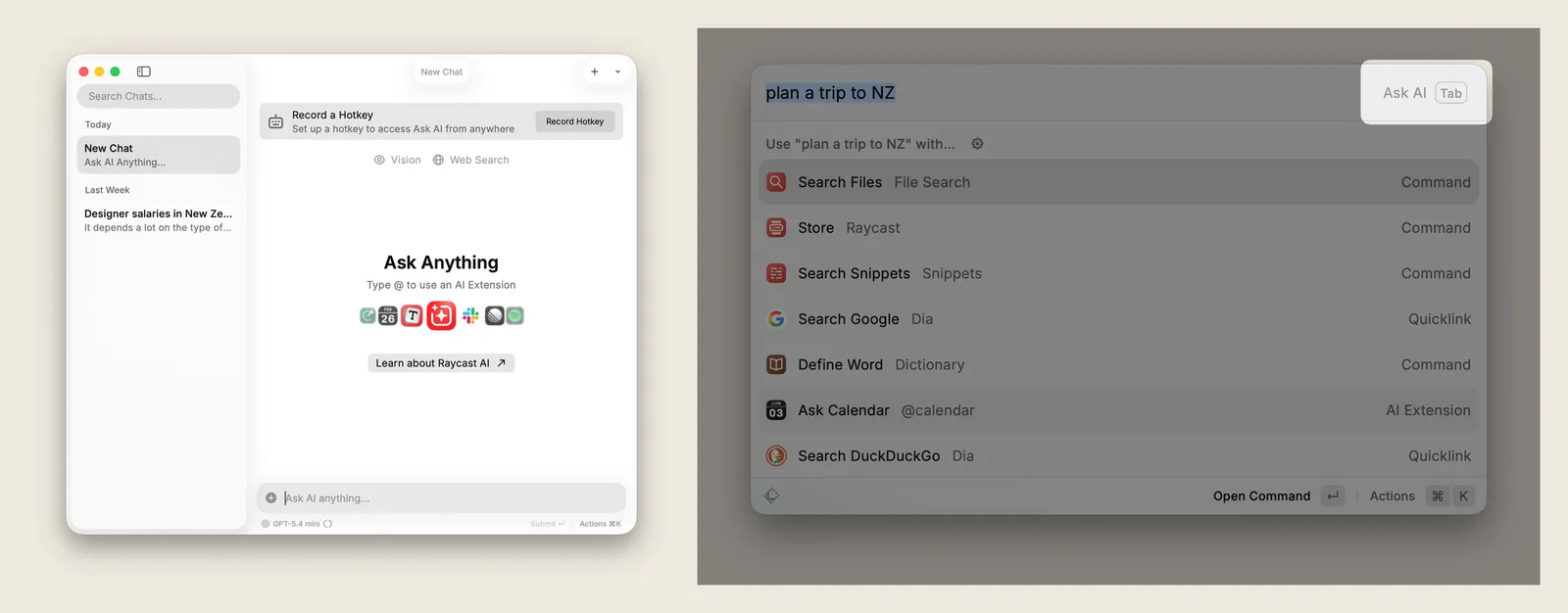
Raycast currently offers two ways into AI.
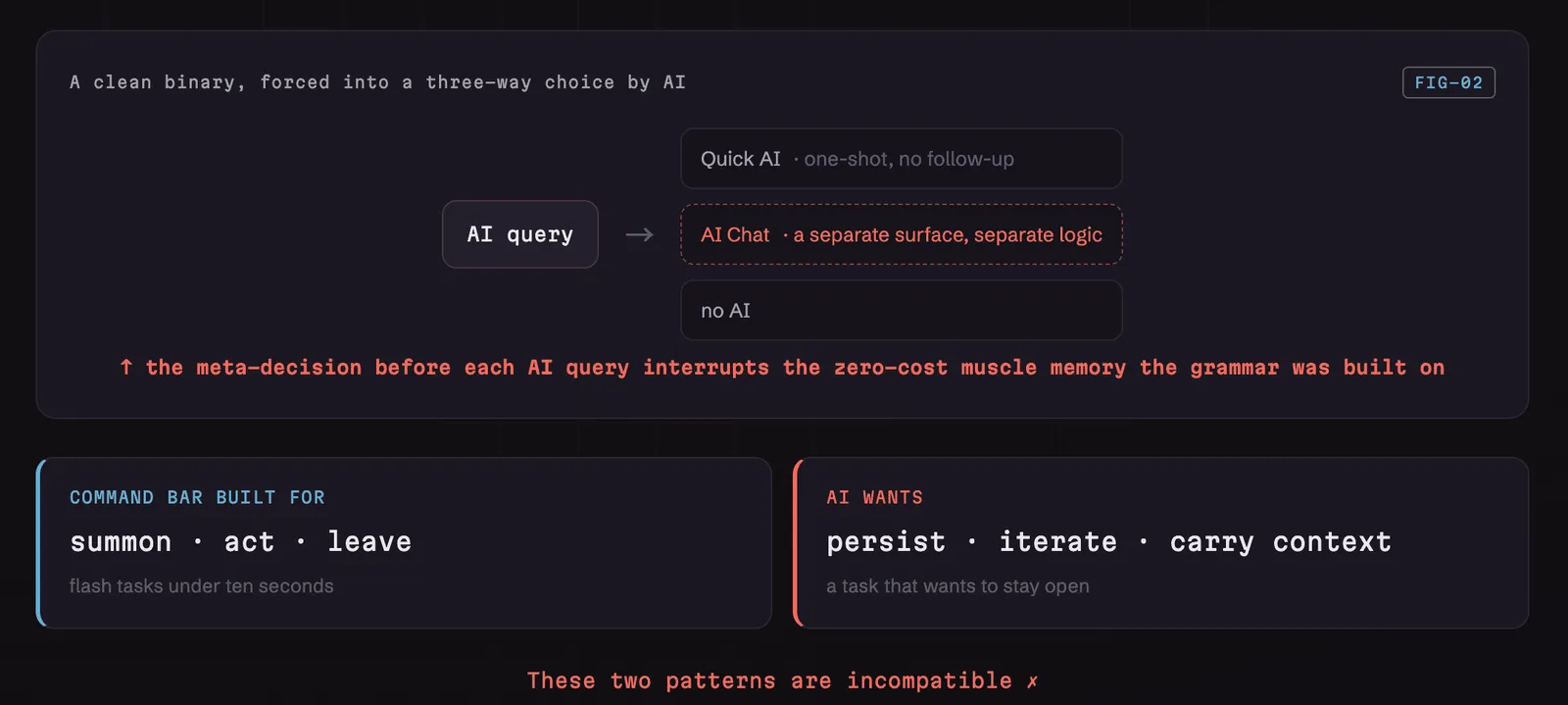
The first is Quick AI. You type a question into the command bar and get one answer. It is fast, but it suits a one-off query. If the answer is not complete enough, you quickly hit the limit.
The second is AI Chat. It has its own window, a conversation history, a model picker and the ability to keep chatting, much closer to how you use ChatGPT or Claude.
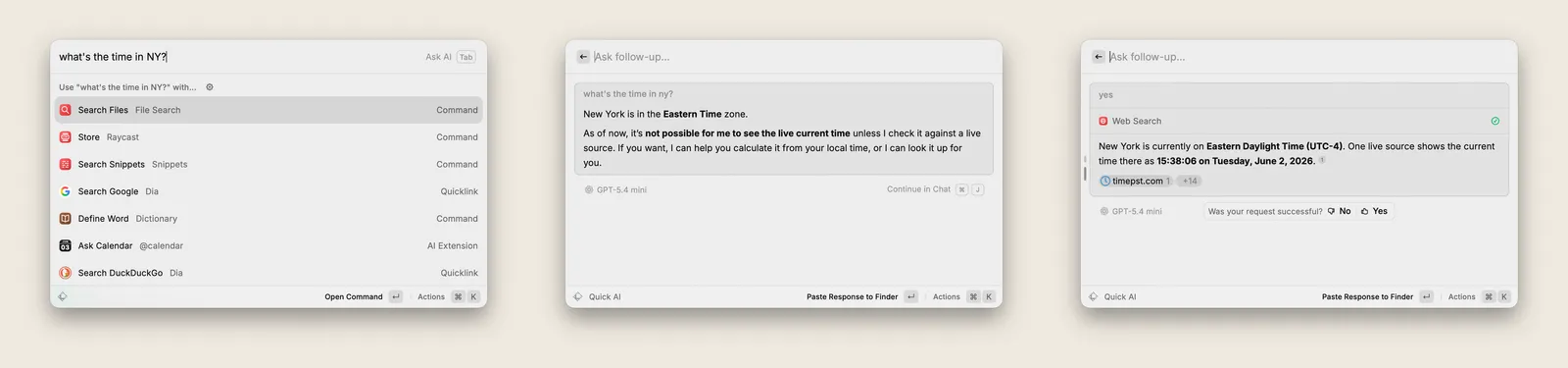
So before you even ask, you have to decide:
Do I just want a quick answer, or am I about to start a conversation?
It looks like a tiny choice, but it changes the very thing Raycast used to be best at. Before, you did not have to think about which mode to enter. Type a command, press Enter, done.
With AI added, you first have to choose Quick AI or AI Chat, and only then can you start the real task.
Raycast used to remove the cost of operating. Now AI has brought back a layer of cost: choosing a mode.
The root of this is not whether the model answers cleverly enough. Even with a stronger model, the command bar still suits one-shot execution, while a conversation needs to stay.
An interface designed for a few seconds of action struggles to hold a task that might last twenty minutes.
This is a problem many mature products run into when they add AI.
A document tool bolts a chat panel onto the side. A browser drops an assistant into the sidebar. A project tool stacks another input box above the existing page. These usually work, but they all give off the same signal:
AI cannot fully fit into the product's original way of working, so the team just adds another interface.
When a new feature has to have its own entry point, its own window and its own operating logic, it is already testing the boundary of the original product.
Why Glaze is more honest than any strategy talk
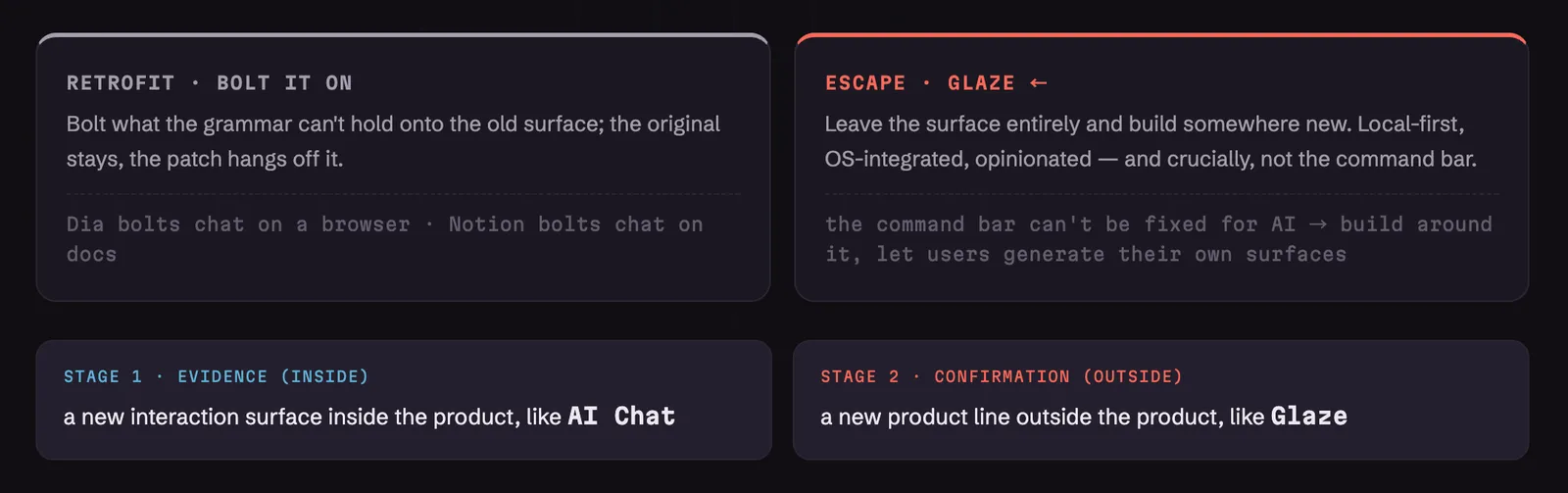
When a product's structure starts to run out of room for a new task, a team usually has two choices.
The first is to keep reworking the existing product. Add a sidebar, a popup, a chat panel or a new working mode, and try to fit the new feature into the current interface.
The second is to leave the existing interface and build a new product.
In March 2026, Raycast shipped Glaze. It lets you generate native desktop apps by talking to an AI. Those apps can reach operating-system capabilities, and the pitch leans on running locally and integrating with the system.
The interesting part is that Glaze was not put inside Raycast's command bar.
It became a standalone product.
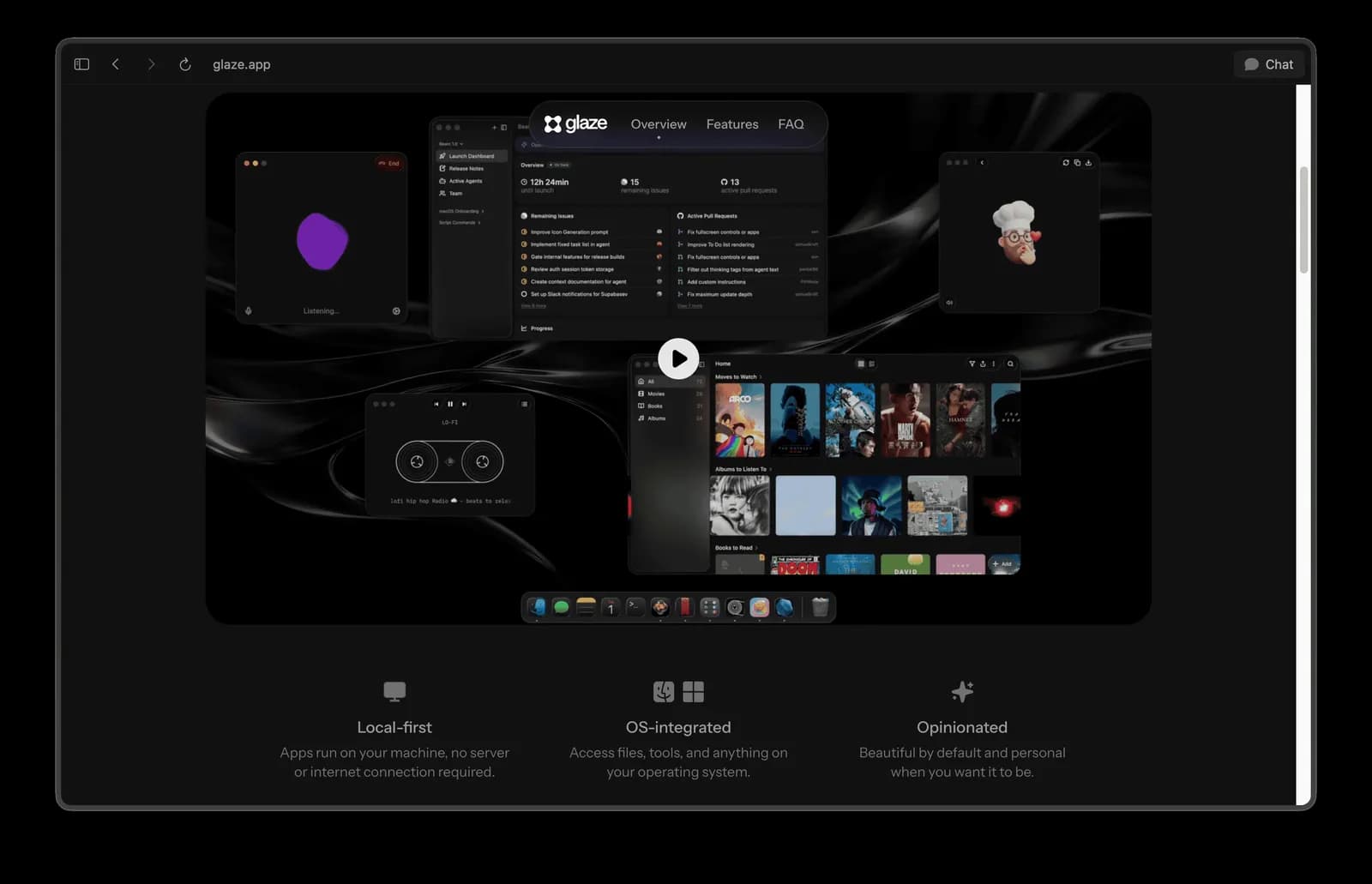
A lot of coverage described Glaze as "Raycast getting into AI apps". Looking at the product structure, it says something else too:
The Raycast team already knows the command bar cannot hold everything they imagine for AI.
Building a standalone product needs a new team setup, engineering, a marketing budget and brand resources. Compared with issuing a strategy statement, that kind of investment says far more about what a company actually believes.
The fact that the team is willing to open a separate product line for Glaze means they think the room inside the existing product is no longer enough.
I call this the Model Ceiling Pivot Signal.
When a new standalone surface appears inside a product, it may mean the original interaction model is near its ceiling. When the team goes further and ships a separate product, that read gets much stronger evidence.
From this angle, Raycast's strategic logic is actually quite clear.
The command bar is good at controlling the operating system, but not at holding complex, ongoing AI work. Since users cannot do everything inside the command bar, Raycast is trying to let them generate new interfaces and apps directly.
If Glaze works, Raycast's position shifts too. It moves from "the launcher that controls your operating system" towards "the platform that generates native apps for your operating system".
It is an ambitious direction, but it is still very early.
As I write this, Glaze is still a waitlist. Coverage of the concept is fairly positive, but the Reddit launch post has only 177 votes. There is no public adoption data yet, not enough evidence about the quality of the generated apps, and no way to tell whether a real developer and user ecosystem will form.
So what Glaze reliably proves right now is Raycast's own read of its limits. Whether it becomes a new growth engine still needs time and product results to answer.
Next time a company ships a new interface or a standalone product, it is worth putting the grand vision in the press release aside for a moment and asking a different question:
What could the old product not do, that forced this company to build a new one?
The answer to that question is usually closer to the real strategy than the official positioning.
Do 2,500 extensions really add up to a healthy ecosystem?
Beyond the interaction model, Raycast's other frequently mentioned strength is its extension store.
Raycast currently has more than 2,500 open-source extensions. Developers mostly write them in TypeScript and React, then build the interface with Raycast's component library.
This model produces a very consistent experience.
Chrome extensions let developers use all kinds of web technology, so their interfaces and quality can vary wildly. Raycast controls the components and interactions an extension can use, so third-party extensions usually look like native features.
The Color Picker extension, for example, has around 450,000 installs and 613 contributors. Installing is simple, the interface is consistent, and the feature is direct enough. This is exactly the state a strong platform ecosystem hopes to show.
The problem is that one star extension with 450,000 installs does not prove the whole ecosystem is healthy.
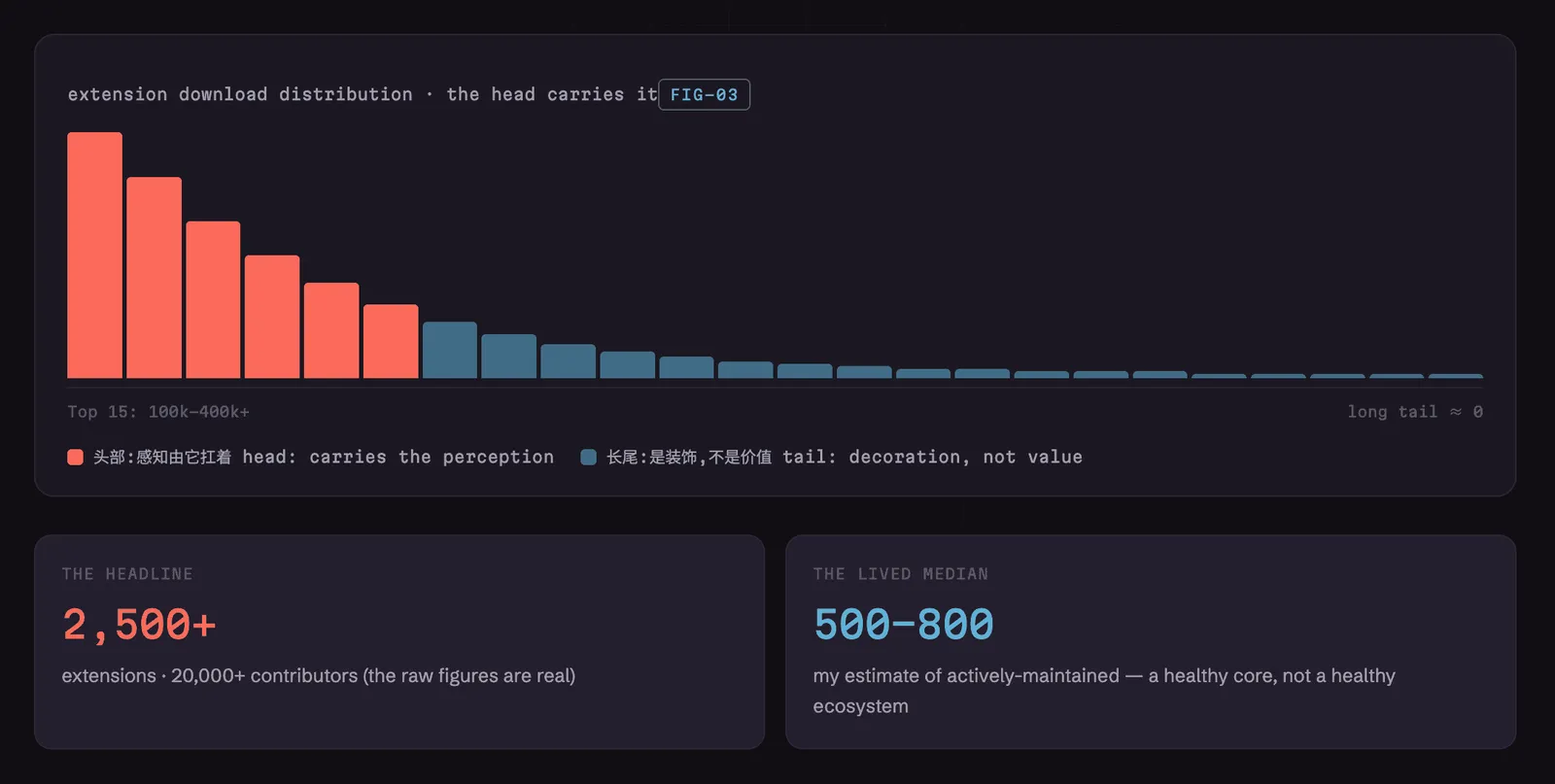
Public GitHub download rankings show that the top 15 extensions mostly have a hundred thousand to over four hundred thousand installs, and then the numbers fall quickly, forming a long, low-activity tail.
Raycast's own extension guide even mentions "abandoned extensions". When a maintainer stops responding, the team steps in after three failed attempts to reach them.
So when you judge an extension ecosystem, you cannot only look at the total count. I pay more attention to three signals.
The first is the distribution between the head and the tail. If the top 20 extensions hold the vast majority of installs, then the large number of long-tail extensions may be worth very little to an ordinary user.
The second is update frequency. Over the past six months, how many extensions are still being updated? An extension still sitting in the store does not mean it still runs, or that its maintainer is still willing to invest.
The third is the rate of new developers arriving. Are new developers and extensions showing up fast enough to make up for the ones that stop being maintained?
Raycast's stated 2,500-plus extensions and 20,000-plus contributors are real signals of scale. But from the data I can see, I would estimate the number of genuinely, actively maintained extensions is probably somewhere between 500 and 800.
That is still a valuable core ecosystem, but it is a completely different state from "2,500 extensions all thriving".
This difference matters, because a lot of people read the extension count directly as Raycast's moat.
If the experience users really depend on is concentrated in a few top extensions, then a handful of important maintainers going quiet could quickly change how the whole ecosystem feels.
A platform's real value usually hides in the median, not in the biggest number.
Why Raycast's most important users sit at the bottom of the page
Raycast's own website exposes this strategic tension in another way.
In the top half of the landing page, Raycast mostly speaks to ordinary knowledge workers. The page uses polished product screenshots and visuals to introduce Clipboard History, Window Management and the rest, with the core message "Your shortcut to everything".
Once you scroll to about 70 per cent of the page, the visual language changes noticeably.
The fonts, the illustrations and the content shift towards an engineering-blueprint style, and the heading becomes "Build the Perfect Tools". This part is aimed at the developers who build extensions.
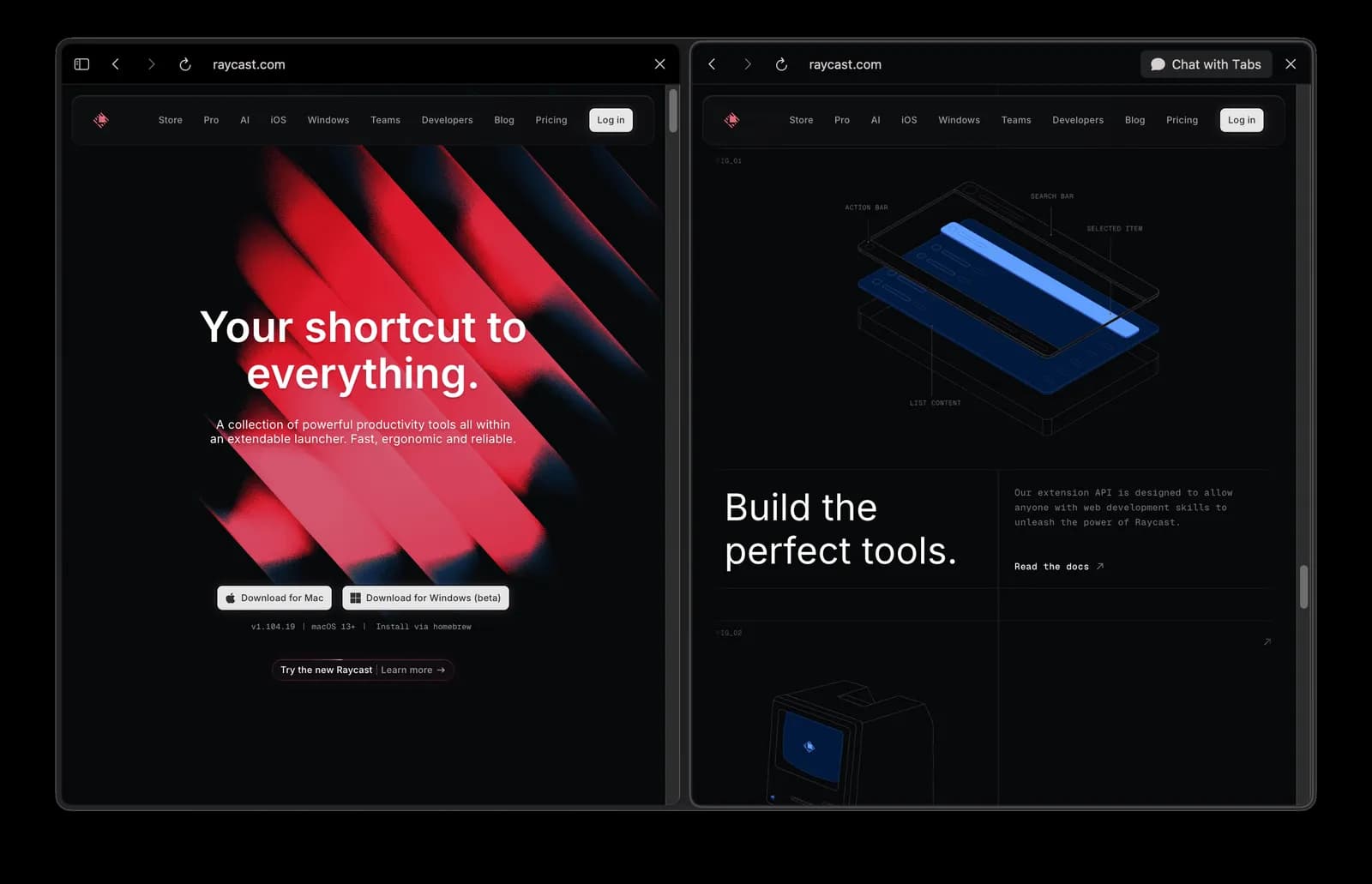
The design itself is precise. A platform product usually has to attract two kinds of people at once: those who use the tools, and those who create them.
What is really worth noting is the order in which they appear.
Most visitors never reach the very bottom of a page. Putting the developer content past roughly the 70 per cent scroll depth means many people leave before they ever see it.
If the extension ecosystem really is Raycast's most important long-term advantage, then developers are the foundation of that advantage. Yet in the site's information hierarchy, they are placed last.
This reveals Raycast's current growth logic:
Acquisition mostly targets knowledge workers, but long-term defensibility depends on developers.
The page serves the former first and puts the latter deeper down. Whatever the company's strategy materials say about the platform vision, the structure of the page shows who is treated as the most important customer right now.
For any product that depends on a third-party ecosystem, one question is worth checking:
The people you depend on most, where do they actually rank in your product and your marketing?
What does Raycast charge for, and what actually defends it?
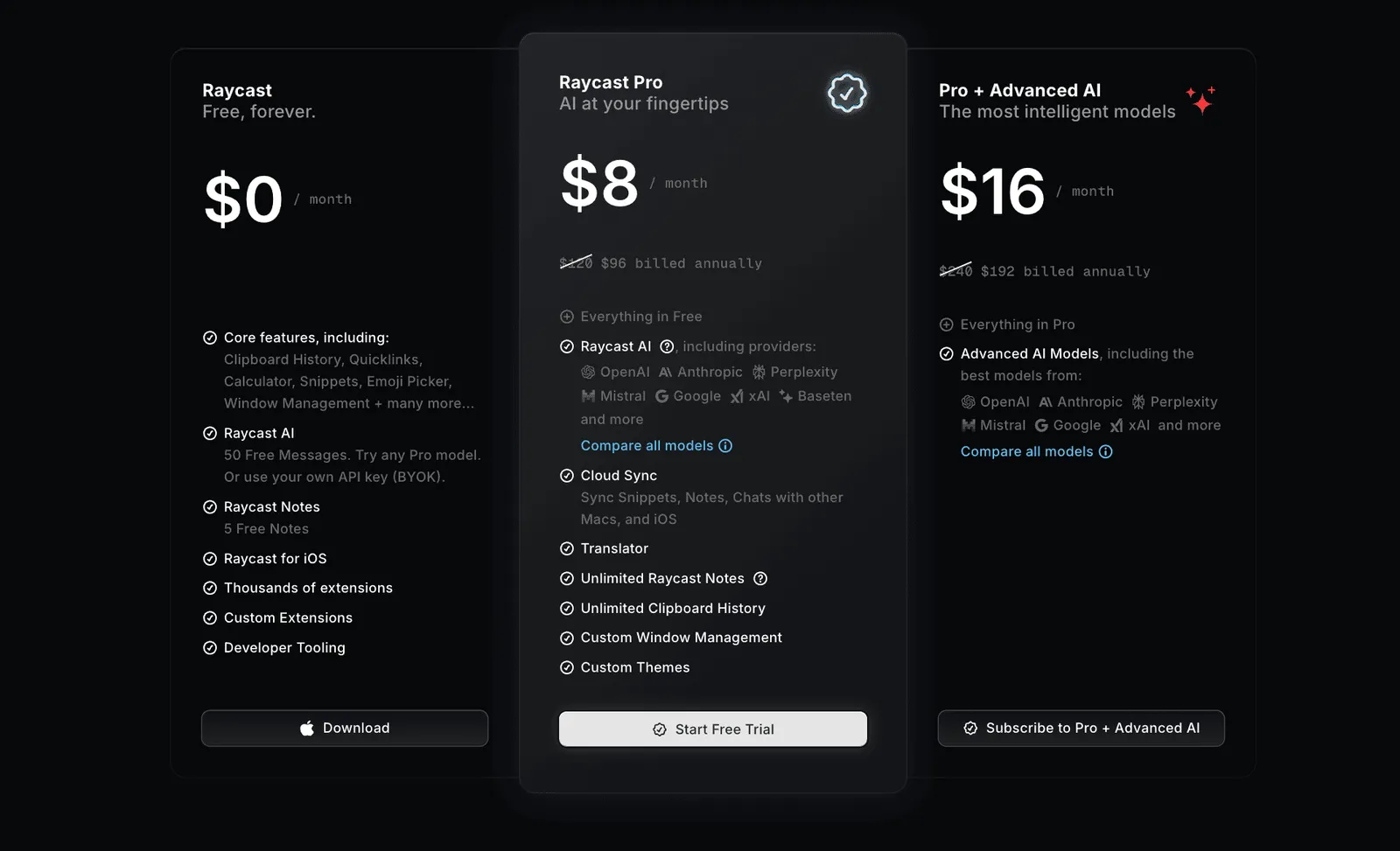
Raycast's core features have long been free, including the launcher, window management, clipboard, Emoji, calculator and Snippets.
The paid plans include Pro at 8 dollars a month, premium AI options, and a Teams plan billed annually at 12 dollars per user per month.
Third-party estimates put Raycast's annual recurring revenue at around 5.2 million dollars, with Pro conversion perhaps between 10 and 15 per cent. Raycast does not publish revenue figures, so treat these as rough references.
The more interesting question is why users pay at all.
For most people, the free version already covers the vast majority of the value in daily use. Window management, clipboard, quick launch, calculation and extensions are all free.
Step up to Pro and the clearest new value comes mainly from AI, plus cloud sync and themes.
This creates a very sharp business question.
Raycast's main reason to pay is AI, but AI is also the feature hardest to fit into its original interaction model.
If users treat Raycast as a quick launcher, and open ChatGPT or Claude whenever a problem gets complex, then they are likely to stay on the free features for a long time, without much reason to upgrade to Pro.
A recurring sentiment on Reddit runs roughly: "I only use Raycast as a quick launcher. When I actually need AI, I still open ChatGPT."
Judged only on product experience, this might look like a small friction. Placed inside the business model, it carries a completely different weight.
If Raycast's long-term advantage comes mainly from the extension ecosystem, then a less smooth AI experience is, for now, just a feature to improve.
If Raycast wants AI to be its main source of revenue, then the same problem hits conversion and retention directly.
How serious a design flaw is depends on which asset the company treats as its future.
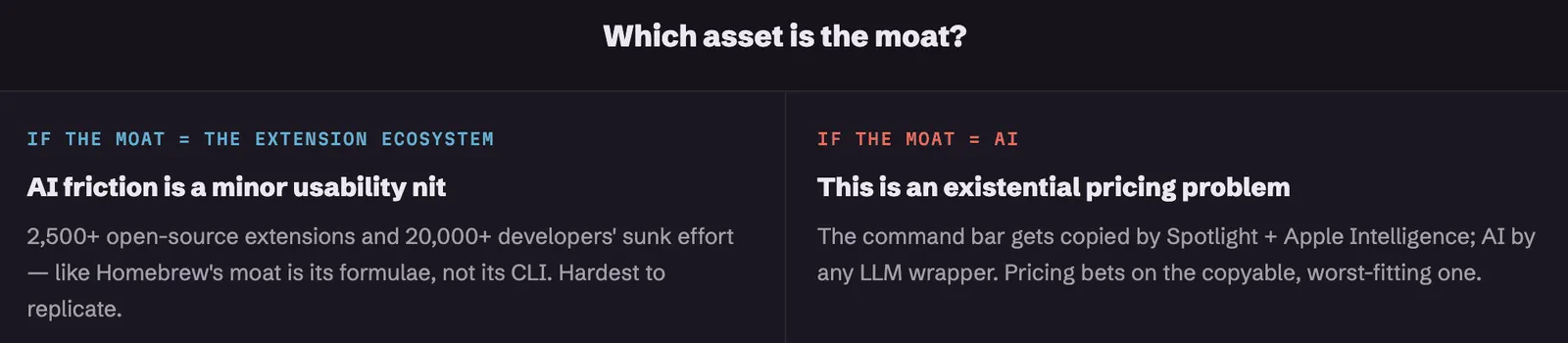
In the long run, the part of Raycast that is hardest to copy is probably neither the command bar nor the AI.
The command-bar experience could gradually be caught up by Spotlight and Apple Intelligence. AI models and chat interfaces are hard to hold as a lasting, exclusive advantage.
Harder to copy are those 2,500-plus open-source extensions, and the time, experience and maintenance cost that more than 20,000 developers have already put into them.
This is a lot like Homebrew's moat. The truly valuable asset is not just the command-line tool itself, but the huge body of packages and community contributions built up around it.
Raycast's most interesting business tension sits right here:
It leans on AI to drive payment, but leans on the developer ecosystem to build its defence.
What it charges for is the layer that fits the product least. What it depends on for the long term is a layer that gets relatively little attention on the website and in the business model.
Whether these two bets eventually meet may decide where Raycast goes next.
What this means if you are building a product
Take the name Raycast away, and what this teardown leaves behind is a few more general questions.
In your product, what is the user's main action? When they need more choices, which layer do they move into? Can that rule cover every feature in the product?
When a feature starts to ask users to switch modes, open a new panel, or even learn a whole new way of operating, is the original structure already near its limit?
When you add AI to a product that was not designed around it, can the AI genuinely fit into the existing workflow, or can it only live in a new chat window bolted on?
If your product depends on a third-party ecosystem, what state are the ordinary extensions and ordinary developers in? If a few top contributors stop maintaining their work, how much real value does the ecosystem have left?
And finally, the most direct question:
The feature you charge for, is it the strongest part of the product, or the most fragile?
The deepest thing Raycast left me with is that a product's biggest strength and its hardest limit can come from the exact same design decision.
Two keystrokes make Raycast easy to pick up, and give it remarkable consistency as an operating-system productivity tool. Learn it once, and you can operate thousands of commands and extensions.
But those same two keystrokes also shaped Raycast into a tool built for quick execution and quick exits.
When AI needs to stay, to go back and forth, and to build up context, that once-near-perfect model starts to fail. Raycast added AI Chat first, and later built a standalone Glaze.
So the most interesting thing about Glaze may not be whether it can generate apps by chat.
It looks more like a receipt, written by the Raycast team themselves, for the cost the command bar could not finally pay.
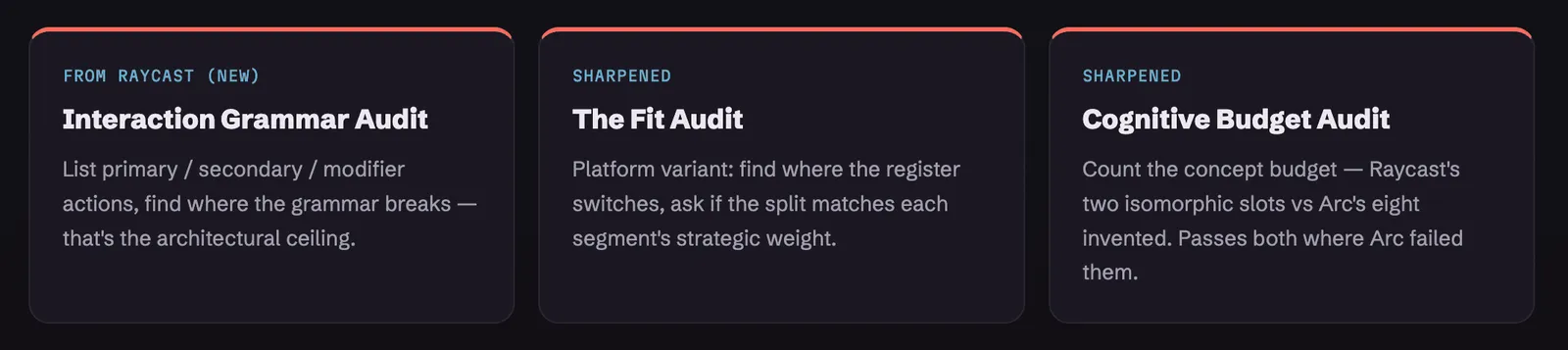
If you cannot quickly answer any one of the questions above, that blank may be worth a closer look.
I keep taking products apart this way, watching how their design shapes user behaviour, business model and long-term strategy.
Sometimes what really changes a company is not whether some new feature looks good enough.
The more important question is whether that feature can still live inside the original house.
If any of those questions landed without a clean answer, that gap is worth a closer look.
I write diagnoses like this one for other products: where your design is quietly serving the wrong outcome, what that is costing you, and what to change first. If you would like one for yours, email me at hi@bearliu.com.